

In December 2025, Shopify dropped its latest biannual blockbuster: Winter ’26 Edition, dubbed the Renaissance Edition. With more than 150 new features and improvements, this release isn’t just an update; it’s a bold statement that AI is transitioning from hype to an everyday superpower for merchants and entrepreneurs.
Shopify calls it a “Renaissance” because, just like the historical era sparked creativity and innovation, these tools amplify human ingenuity while handling the heavy lifting. If you’re a Shopify merchant, developer, or just watching eCommerce trends, this winter ’26 edition could redefine how you run your business in 2026.
Winter ’26 Edition Overview
Winter ’26 edition overview is the perfect place to set the stage for what Shopify Winter ‘26 is really about for store owners. This winter ’26 edition is called the Renaissance edition because it blends the spirit of a creative rebirth with the power of artificial intelligence.
Instead of focusing solely on small tweaks, Shopify uses this release to push a bigger idea: AI should work alongside merchants like a smart partner, not as a distant, intimidating technology. The goal is to help you run your business faster, smarter, and with less manual effort, while you stay in full control of the important decisions.

At the heart of this Winter ’26 edition is a shift toward “AI native commerce.” That means many of the tools you use every day in Shopify now have AI built into them by default. Editing your theme, planning campaigns, testing changes, creating workflows, checking reports, or even seeking strategic advice can now begin with a natural language prompt instead of a blank screen.
For a busy store owner, this changes the experience from “What do I do next?” to “Here is what you should try next based on your customers and store data.” It is designed to lower the barrier for non-technical founders while also saving time for experienced teams.
Winter ‘26 also covers a very wide surface area. It introduces over 150 improvements across the admin, storefront, marketing, analytics, payments, inventory, point of sale, and developer ecosystem. Some updates are large and visible, such as AI agents that help you sell within chat platforms or simulate how shoppers behave before a launch.
Others are quieter, but still powerful, like better bulk operations, more flexible product variants, or cleaner analytics. Together, these changes are meant to support you whether you run a small single-product store or a complex brand with multiple locations and sales channels.
This winter ’26 edition matters because it turns AI from a buzzword into a set of practical tools that you can use every day. Instead of asking you to change your entire business, Shopify tries to meet you where you already work: inside the admin, the theme editor, your reports, and even your checkout, and enhances your workflows with the power of AI.
AI-Powered Sidekick Upgrades: Evolution from Assistant to Collaborator
AI-Powered Sidekick upgrades in Shopify’s Winter ’26 Edition are designed to feel like working with a smart, obsessed partner who cares about your store as much as you do. Instead of just answering questions, Sidekick now helps you plan, build, and execute tasks across your Shopify admin in a much more active and efficient way.
Sidekick Pulse: Your Strategic Co-Pilot
Sidekick Pulse uses data from your store and wider market trends to suggest what you should do next, not just what you ask for. It can highlight slow-moving products, seasonal opportunities, or underused features, and then guide you step by step to take action. This turns Sidekick into a real strategic helper, especially useful if you feel overwhelmed by everything you could optimize.
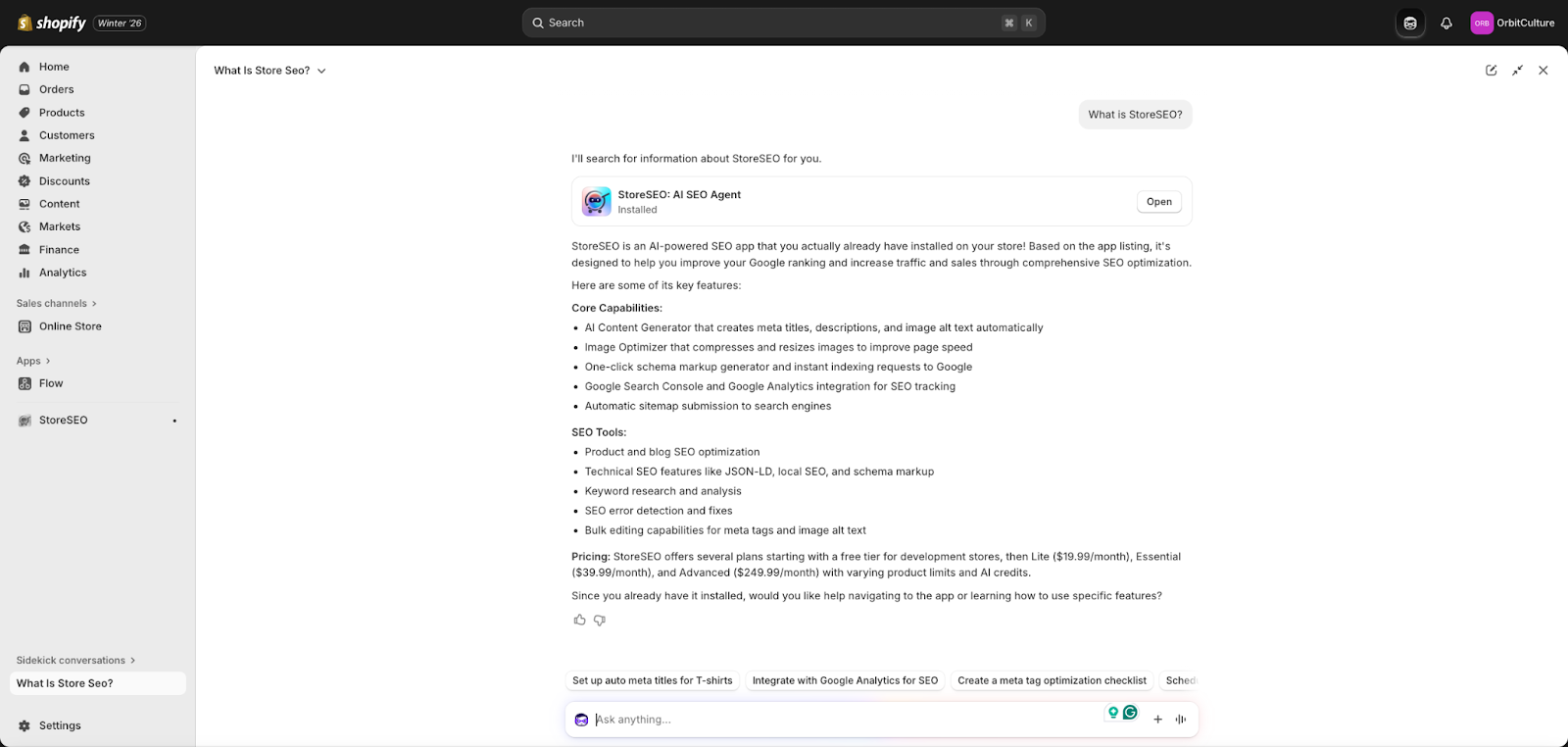
Sidekick also remembers your previous chats and preferences, so over time, it starts to understand how you like to work. That means the advice and suggestions become more tailored to your business model, your tone, and your priorities, making each interaction more efficient and personal.
Building Custom Apps and Workflows with Simple Prompts
One of the biggest upgrades is Sidekick’s ability to help you get custom tools without needing a developer on day one. You can describe the kind of app or automation you want, and Sidekick helps build it, custom to your store’s needs, using Shopify’s app platform and Shopify Flow.
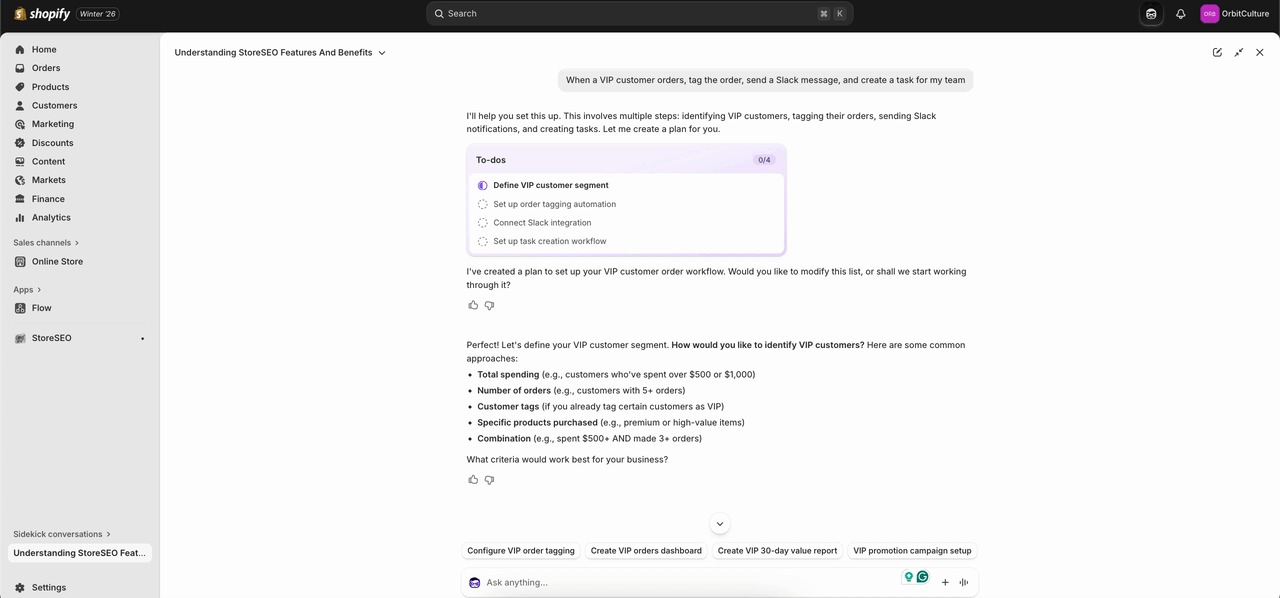
For example, you can explain a workflow like “When a VIP customer orders, tag the order, send a Slack message, and create a task for my team,” and Sidekick can set that up in Flow for you. This saves hours of trial and error in settings screens and makes advanced automation accessible to non-technical store owners.
Design, Theme, and Content Edits Made Easy
Sidekick now goes much deeper into design and content changes. You can tell it what kind of theme update you want, such as increasing the focus on a new collection, changing button styles, or adjusting layout sections, and it can update your theme instantly.
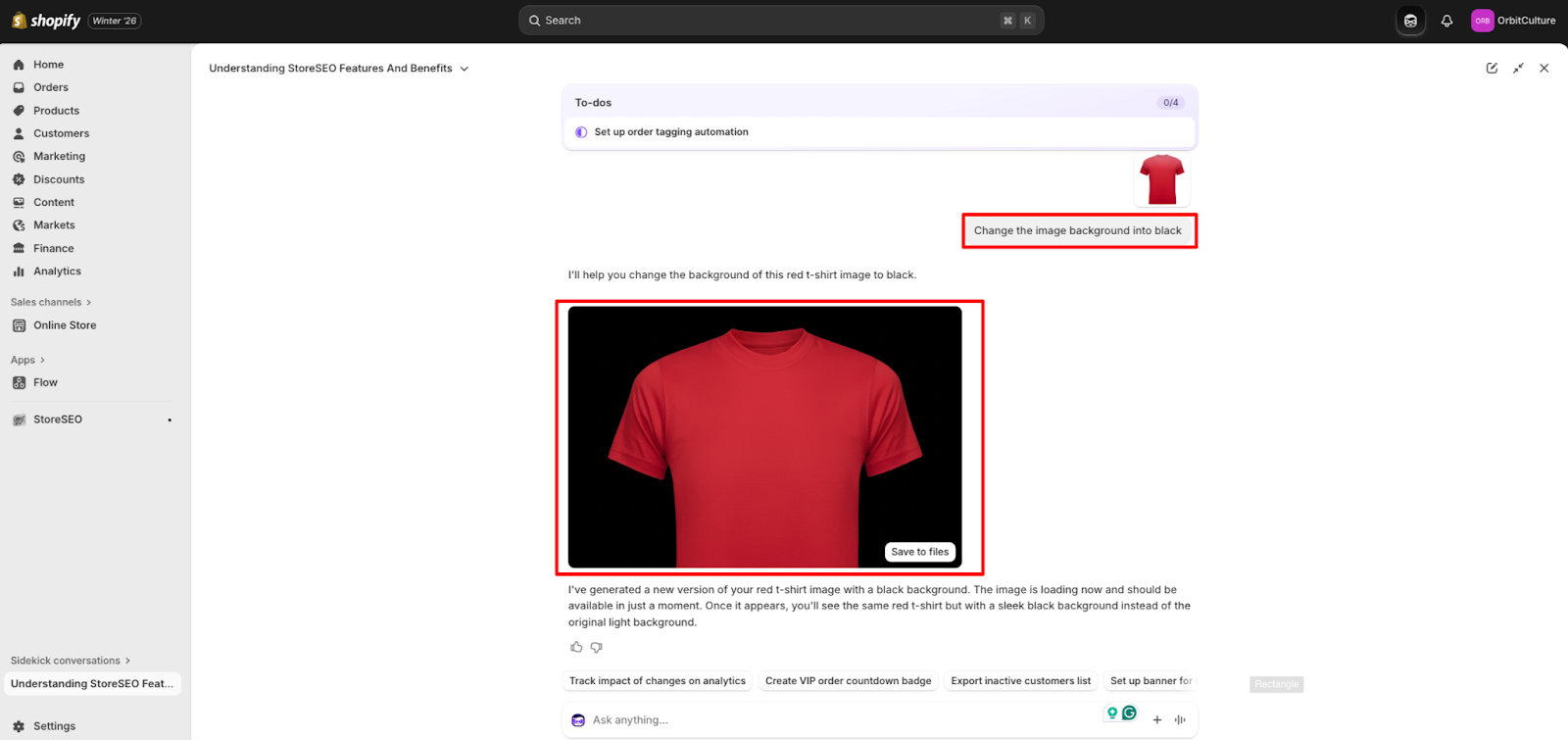
It also works with images and creative assets. You can prompt Sidekick to change image backgrounds, remove or add elements, or expand the canvas size to better fit your design. Moreover, these design or layout modifications can be made globally to reflect on your entire store, not just on individual blocks on your website.
On mobile, you can even turn regular product images into polished product shots using the file editor, which is extremely helpful if you do not have a professional photographer on call.
Smarter reporting, segments, and email support
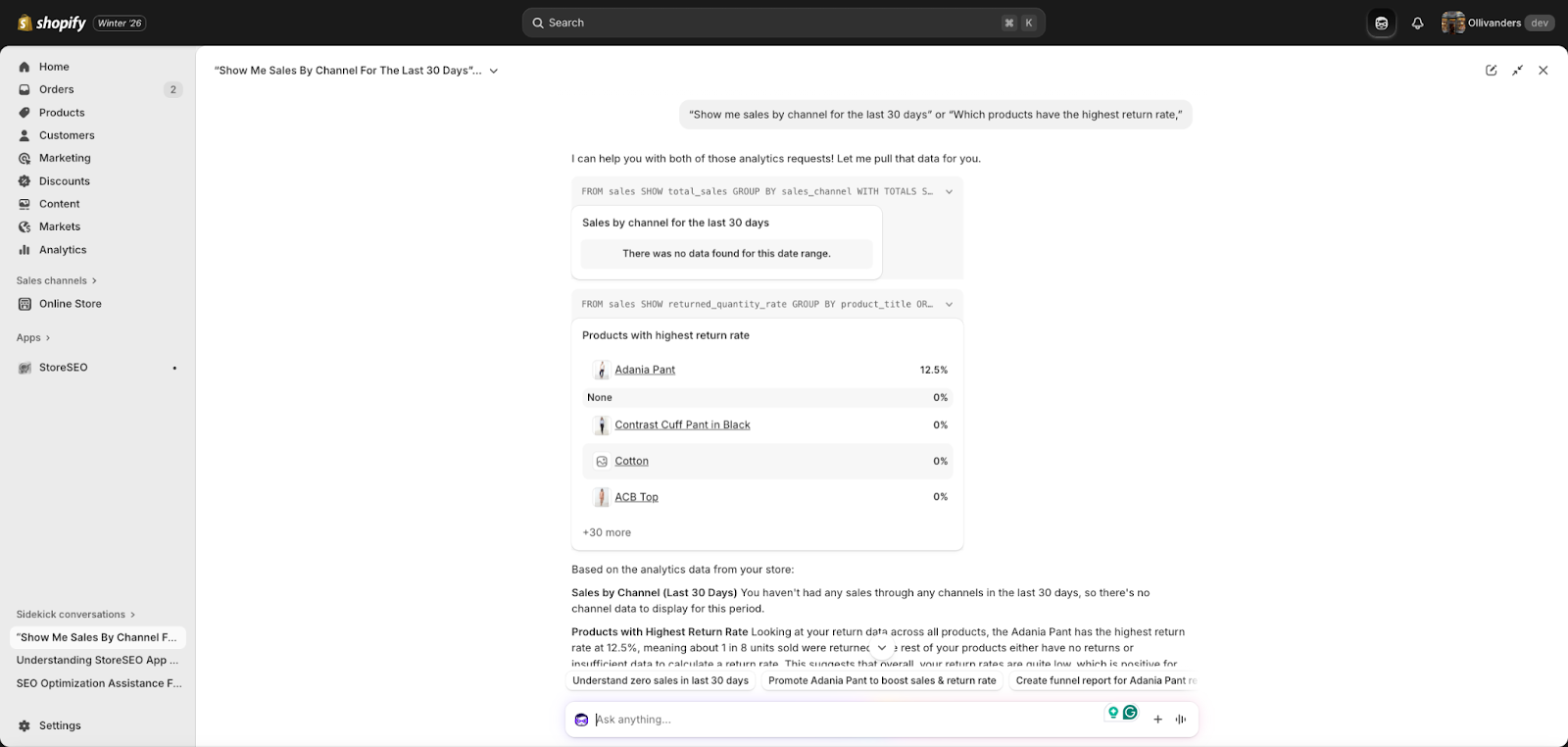
For store owners who care about numbers, Sidekick can generate custom reports and visualizations directly in the ShopifyQL query editor. You can ask questions like “Show me sales by channel for the last 30 days” or “Which products have the highest return rate,” and Sidekick can build the queries and charts for you. This lowers the barrier to using advanced analytics to better understand what works for your store.
Sidekick can also assist with building customer segments, either by refining existing ones or generating new ones from scratch based on your goals. On top of that, it helps edit marketing emails directly inside the Shopify Messaging app, so you can adjust subject lines, copy, and structure with natural language prompts, instead of rewriting everything yourself.
Skills, Multi-Step Task Management, and Working On The Go
Another powerful upgrade is the idea of Skills. You can turn your best prompts into reusable recipes or “Skills”, then share them with the community and discover what other merchants are using. This means you do not need to remember the exact wording that worked before, and you benefit from proven workflows created by others.
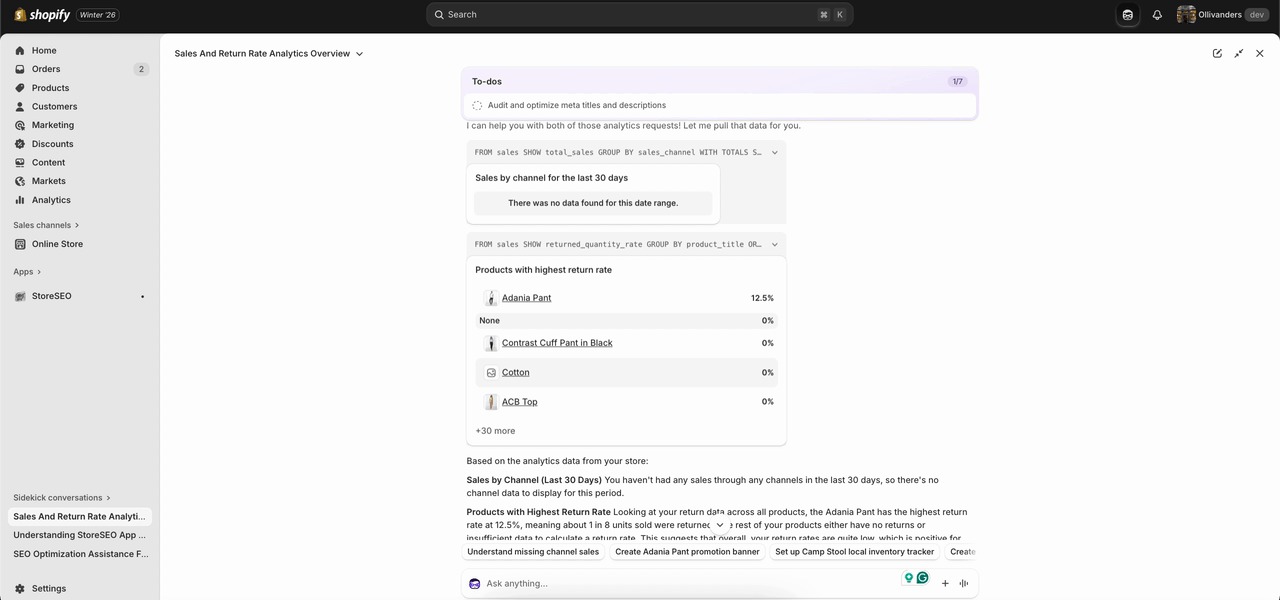
Sidekick is now better at handling more complex, multi-step tasks. It can plan to-do lists, chain actions, and keep context as it works through your requests. You can also speak with Sidekick in the Shopify mobile app, and it can go full screen on desktop to give you more space when you are working through big projects. This makes it feel less like a small chat bubble and more like a full work interface.
Shopify Agentic Storefront and Selling Innovations
Storefront and selling innovations in Shopify Winter ‘26 are all about helping store owners meet customers where they already spend time and making every change safer and more profitable.
AI Chat Shopping and Agentic Storefronts
Shopify is pushing a big shift with AI chat shopping. Instead of waiting for people to visit a website, merchants can now show products directly inside popular AI assistants such as ChatGPT, Copilot, and Perplexity. The idea is simple. When shoppers describe what they want in an AI chat, Shopify can surface relevant products from connected stores so they can browse and buy without leaving that conversation.
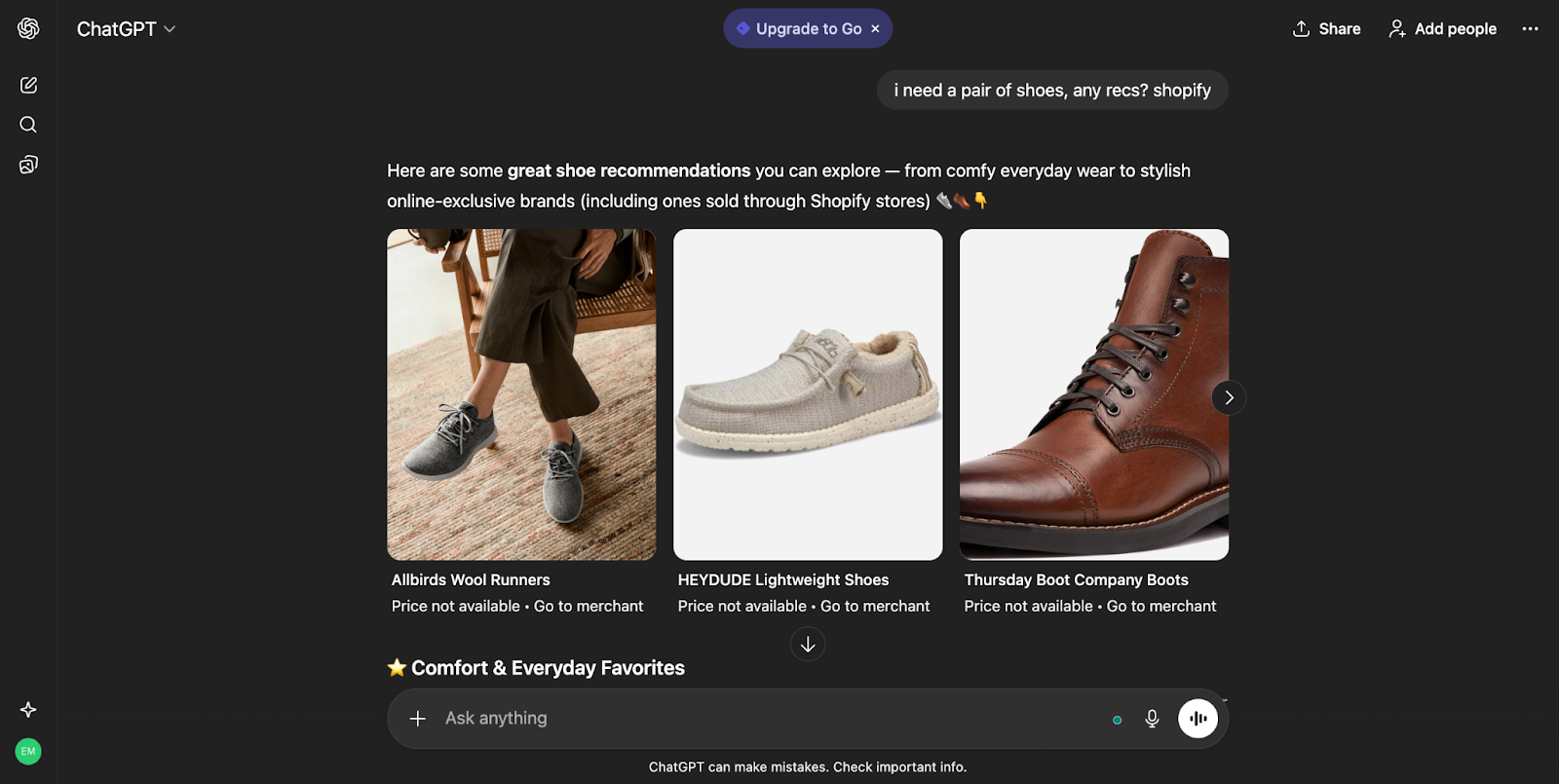
For store owners, this reduces the friction between discovery and purchase. Once the store data is connected, products become discoverable across these AI channels without the need for separate complex setups or integrations for each one.
Store owners set up their catalog once, manage how their brand appears and on which platform, and Shopify’s agentic storefront layer handles the rest across different AI platforms. This makes the store feel “present” in more places and platforms, without extra daily work.
Smarter, Safer Experimentation with Rollouts
Another major innovation is the way Shopify helps merchants test and launch changes through built-in A/B testing with Rollouts. Instead of changing a theme or layout and hoping for the best, store owners can schedule theme changes, display different versions to different visitors, and compare performance directly within the Shopify admin. This includes theme changes for big campaigns, like a seasonal sale design or a new homepage layout.

Source: Shopify
This matters because every change carries risk. A well-designed layout can still hinder conversions if it confuses buyers. With Rollouts, merchants test versions side by side, see which one brings more sales or a higher average order value, and then roll out the winner with confidence. In addition to more control and flexibility, Rollouts provides the insights you need inside the Admin to improve conversions and boost revenue growth.
It turns design and UX decisions into measurable experiments, rather than relying on gut feeling alone.
Simulated Shopper Behavior With SimGym App Before Going Live
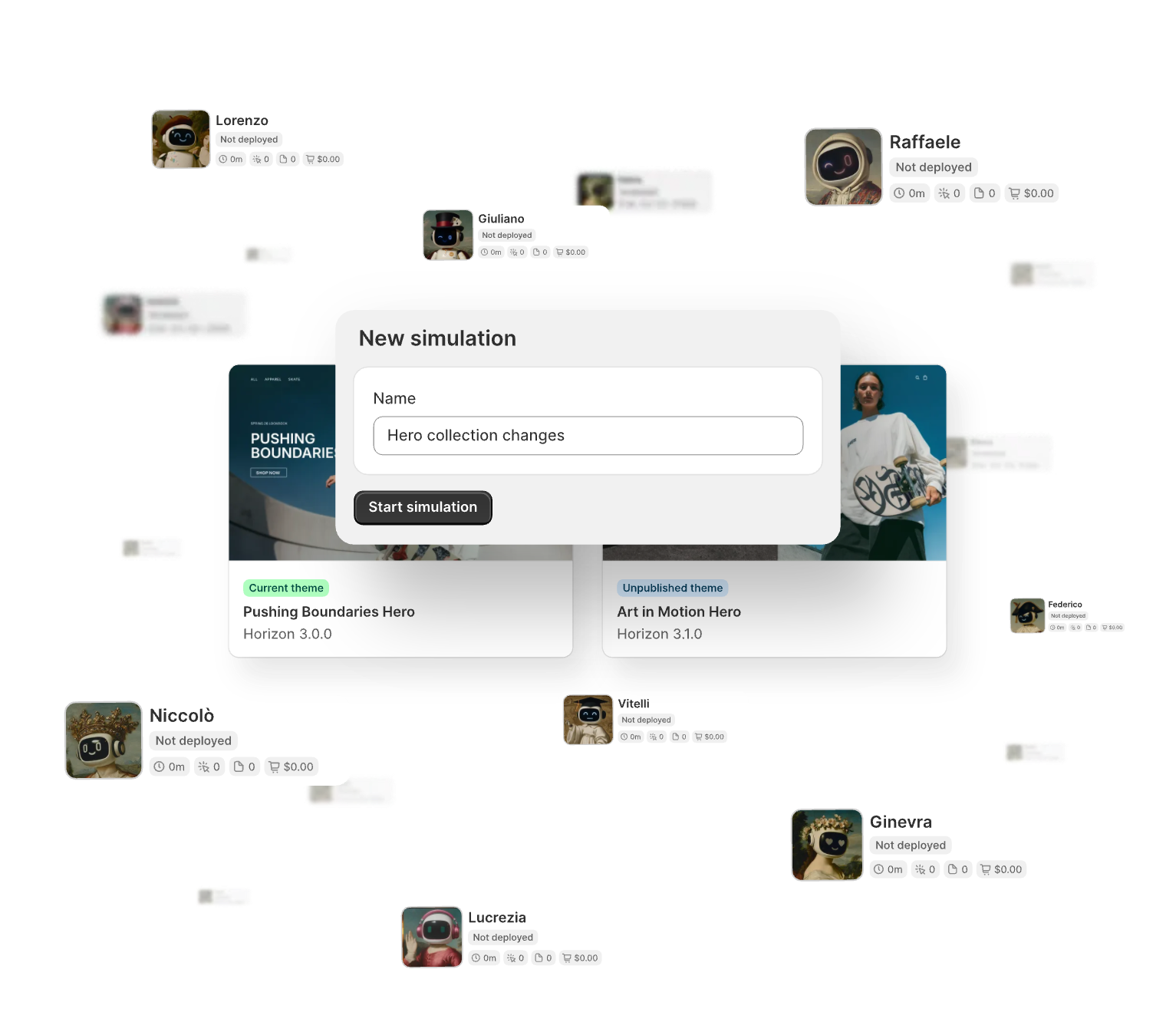
With this winter ’26 edition, Shopify also introduces AI agents or apps such as “Shopify SimGym” that let you simulate shopper behavior, often referred to in the ecosystem as tools that model how real customers might behave based on billions of past purchases, even before real customers experience them.
These AI agents “walk” through the store, interact with pages, and try different paths that real people usually take. The goal is to find problems or opportunities before a human visitor ever sees the change, and share suggestions that can actually make a positive impact.
Source: Shopify
For example, if a merchant changes during navigation or adds a new bundle offer, AI agents can show whether people are likely to miss key products, drop off at a certain step, or get stuck on a particular page. The merchant then receives actionable recommendations in clear language, such as improving a call-to-action, moving an important section higher on the page, or clarifying pricing. This reduces the risk of broken flows during sales, product drops, and other high-pressure events.
Easier Merchandising Inside The Store & Countless Enhancements
On the storefront side, Shopify also rolls out practical improvements that support these innovations. Store owners can create products with up to 2048 variants, which helps brands with large catalogs and many options, such as different sizes, colors, and lengths. They can also hide products from search and collections while still making them accessible through direct URLs, which is useful for private drops, special campaigns, or exclusive customer segments.
Inventory and Product Tools With The Renaissance Winter ’26 Edition
Shopify Winter ‘26 is designed to help store owners manage large catalogs, complex variants, and smarter merchandising with less manual work. These changes focus on giving you more control over how you structure products and how you present them to shoppers, while keeping your backend clean and predictable.
More Variants for Complex Catalogs
One of the biggest changes brought within the Winter ‘26 Edition is the ability to create products with up to 2048 variants. This matters if you sell items with many options, such as different sizes, colors, lengths, materials, or styles. Instead of splitting these into multiple products or using confusing workarounds, you can keep everything under one main product catalog and manage it in a single place. This helps you maintain accurate inventory and makes your product pages easier for shoppers to understand.
At the same time, combining options in the Shopify Bundles app, such as size and length together, lets you build richer product configurations without making the variant structure unmanageable. Think of it as a way to reflect the real-world variety of your products while still keeping your catalog organized.
Unlisted Products for Controlled Visibility
Another useful capability is the new “unlisted” product status, which lets you hide products from search results, collections, and other discovery surfaces, while keeping them accessible by direct URL. This is particularly powerful for pre-launch offers, private collections for VIP customers, B2B clients, or special campaigns you don’t want every visitor to see. You can share links in email, SMS, or private communities and keep the rest of your storefront clean.
This also reduces clutter in your main navigation and search, while providing you with more advanced merchandising options. For example, you can run limited drops or early access promotions without having to constantly change visibility settings for entire collections.
Smarter Collection and Discount Workflows
Shopify has also made it easier to manage collections and discounts at scale. You can now duplicate collections, which is useful when you want a similar structure for a seasonal update or a new region, and then simply adjust the rules instead of rebuilding from scratch. You can also exclude products from smart collections using conditional logic, which gives you more precise control over what appears in each collection.
On the pricing side, you can set up comparisons directly from the admin, eliminating the need for CSV imports or external tools. This makes it simpler to run price-based promotions, highlight discounts, and experiment with A/B testing of pricing strategies. You can also create automatic discounts that target specific customers such as VIPs, which allows you to personalize offers without complex workflows.
Flexible Pricing and Measurement Options
For stores that sell by weight, volume, length, or quantity, Shopify now supports displaying prices by unit in metric, imperial, or simple counts on a global basis. This is especially important for food, cosmetics, fabric, building materials, or any product where the unit price affects trust and conversion. Clear unit pricing enables customers to quickly understand value and reduces the need for support questions.
Together with more variants and better bundles, this makes it easier to sell technical or regulated products in a way that aligns with how customers actually purchase in your niche. You can align your pricing and measurement with local expectations without maintaining separate workarounds per market.
Filling gaps with Product Networks and Bundles
The Winter ‘26 updates also introduce and expand tools that help you fill assortment gaps and increase average order value. Through Shopify Product Networks, you can choose to surface products from other Shopify brands in your search, collections, emails, and post-purchase pages, and earn a commission on every sale. This means you can fill holes in your catalog without carrying inventory or taking on additional risk, while still providing customers with a complete experience.

Source: Shopify
Why This Matters for Store Owners
All of these inventory and product tools share a common goal: to help you model your real business within Shopify without relying on constant hacks, spreadsheets, and manual edits. Higher variant limits and better bundles allow your catalog to grow with your brand, rather than forcing you to split products. Unlisted products and enhanced collection logic provide you with more nuanced control over what buyers see at various stages of their journey.
Tinker: Unified App To Explore All AI-Powered Tools
And finally, Shopify is launching a mobile app, named Tinker, that brings together Shopify’s premium Artificial Intelligence (AI) tools (which are usually spread out or sold separately) into one convenient, affordable place.
POS and Operations Enhancements For Shopify
Shopify’s Winter ‘26 Edition is designed to make in-store selling smoother, more reliable, and easier to manage alongside your online store. These updates help you reduce friction at the counter, maintain accurate inventory, and provide clearer visibility into what is happening across your business.
Reliable Selling with POS Hub
The new POS Hub acts as the central brain and connection point for your in-store hardware. Instead of dealing with unstable Bluetooth connections, it lets you plug in card readers, barcode scanners, and printers directly for a strong, wired link that is much less likely to drop during busy periods. This setup means your staff can focus on serving customers instead of troubleshooting devices.
Because the software inside the POS Hub is designed to work closely with Shopify POS, data flows seamlessly between your hardware and your store. Orders, payments, and receipts stay in sync with your online backend, so what happens at the counter is reflected in your admin without extra manual work or exports. For growing retailers, this creates a more professional in-store experience and lowers the risk of mistakes.
Smarter In-Store Subscriptions and Local Selling
Source: Shopify
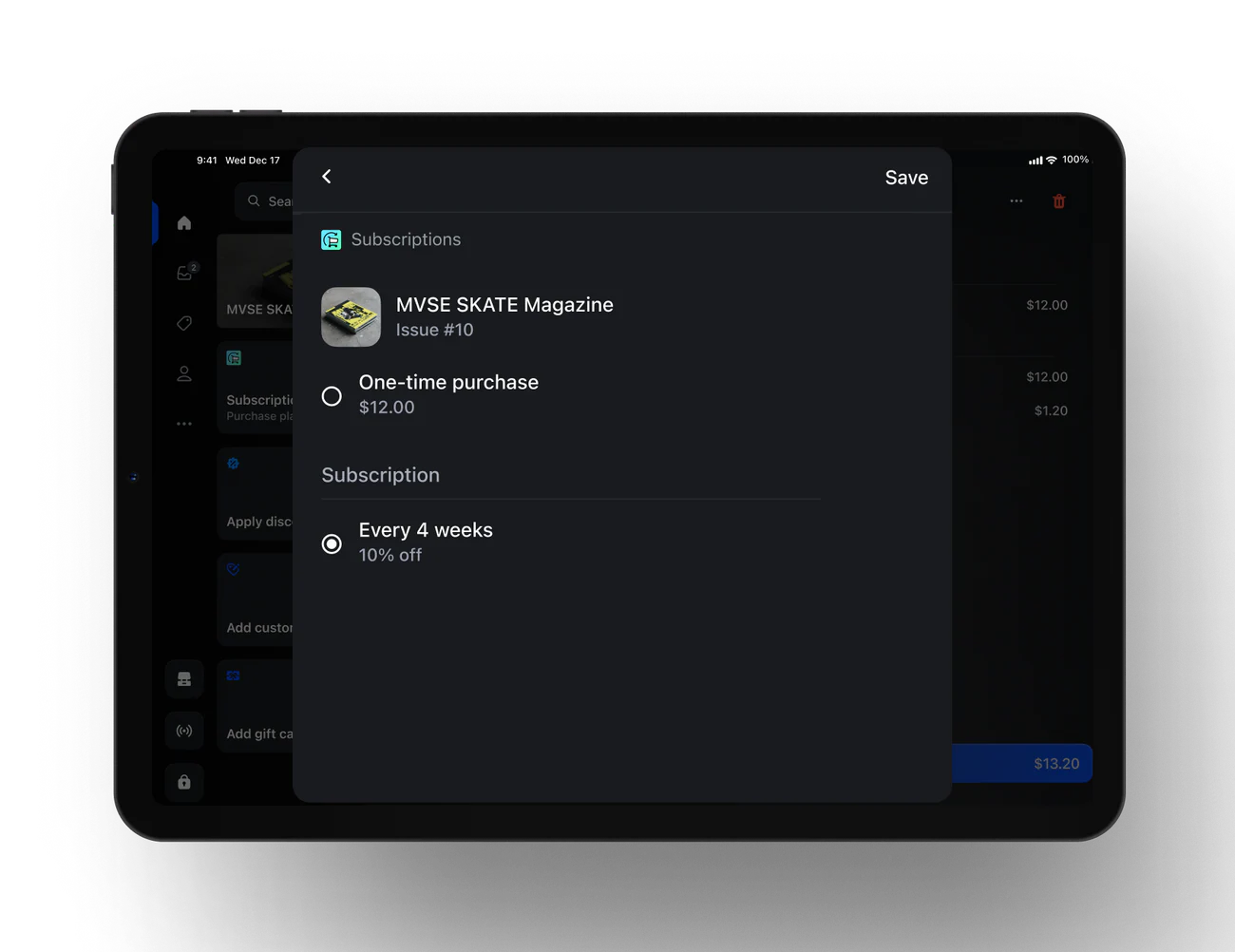
Subscriptions are no longer just an online feature. With Winter ‘26, customers can sign up for subscriptions directly in store through the Shopify Subscriptions app on POS. This is very helpful if you sell consumables, refills, or services and want customers to commit to regular purchases while they are in your shop.
Local selling gets a boost, too. You can offer fast local delivery for online orders with live tracking through partners like Uber Direct, so your physical store becomes a true local hub for both pickup and delivery. This helps you capture buyers who want the speed of local delivery without the cost and complexity of running your own fleet.
Better Inventory Control from The Counter
Inventory accuracy is one of the hardest parts of retail, and Winter ‘26 brings tools that help you stay on top of stock without leaving the POS. Staff can scan and update inventory directly from the point of sale, which keeps stock levels aligned with what is actually on the shelves and in the back room. This is especially useful in fast-moving stores where items are constantly being sold, restocked, or moved.
You can also set unique prices and product availability per retail location and online, which means you can run store-specific promotions or keep certain items exclusive to physical shops if you want to drive foot traffic. This flexibility lets you test different strategies by market or store type without breaking your overall catalog structure.
Flexible Payments and Refunds In-Store
Customers now have more ways to pay in person. Winter ‘26 expands support for Tap to Pay on iPhone and Android to more countries, and adds local payment methods like iDeal, Swish, Twint, and Mobilepay through QR-based flows. This helps you match local buyer expectations and close more sales because shoppers can use the payment method they trust.
On the operations side, returns and exchanges are easier to manage with more control in POS. You can create custom return and exchange receipts that include your logo, return policy, and contact details, which makes your processes look more professional and clear. There is better tracking of in-progress returns and more precise options for refunding to original payment, gift card, or store credit, so your accounting stays clean and you avoid confusion at the till.
Customization and Control Over the POS Experience
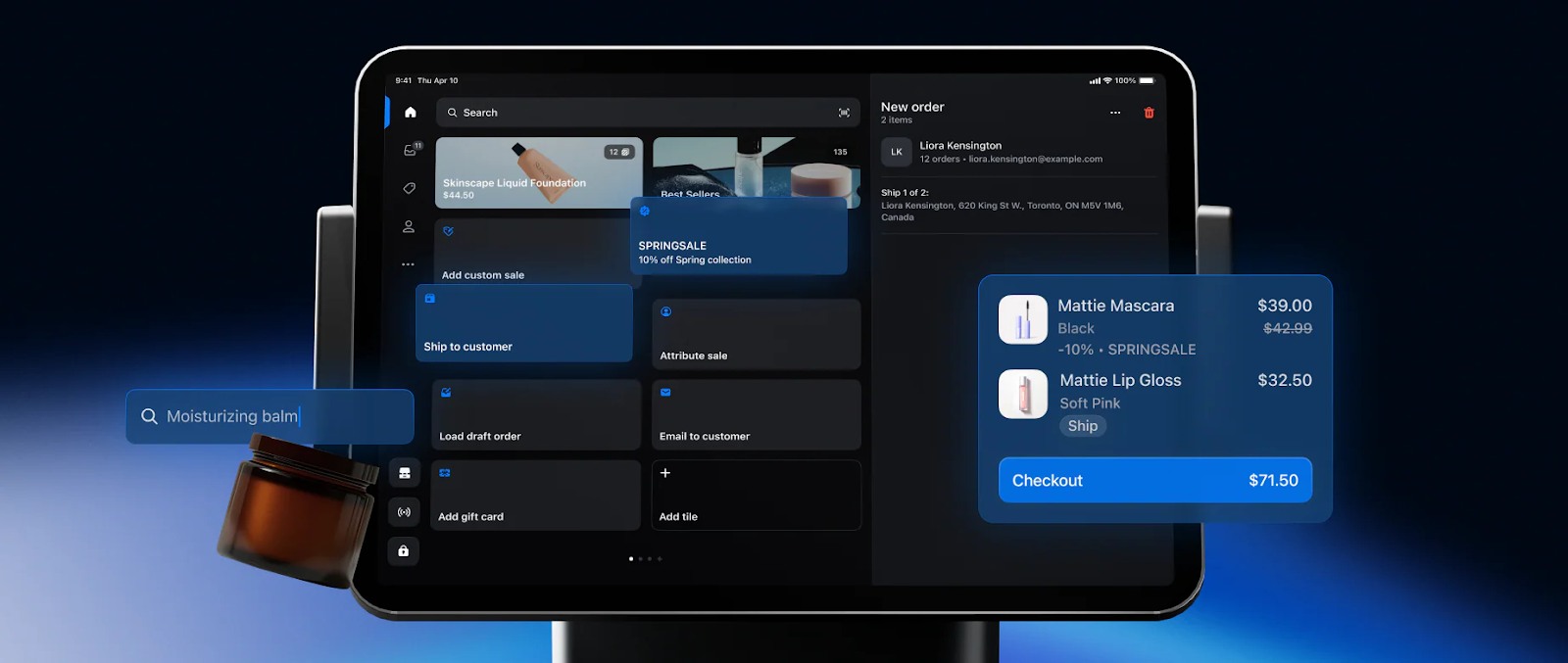
Shopify has also made it easier to shape how your POS looks and behaves. You can customize the customer display, smart grid layout, receipts, and lock screen from a single editor. This allows you to design a checkout flow that fits your brand and makes it simple for staff to find the tiles and actions they use most often.
Payments and Financial Wins
Payments and financial tools in Shopify’s Winter ’26 Edition are designed to help store owners keep more control over their cash flow, lower friction at checkout, and make smarter money decisions without needing a finance background. These updates focus on giving you faster access to funds, more flexible ways to accept payments, and better visibility into your real costs so that you can plan growth with more confidence.
Source: Shopify
Smarter Funding with Shopify Capital
Shopify Capital now works more like an ongoing growth partner rather than a one‑time loan source. You apply once, and as you repay, you can get replenished funding offers based on your sales performance and repayment history, subject to approval. This means your access to capital can grow as your store grows, which is helpful when you are planning things like inventory buys, seasonal campaigns, or product launches.
There are also region-specific improvements, such as fast funding with adjustable repayment terms in countries like the Netherlands, Spain, and Ireland. Instead of worrying about rigid bank loan schedules, you can choose terms that match your sales cycles, so repayments feel more natural and less risky during slower months.
Everyday Money Management with Shopify Balance
Shopify Balance is evolving into a more complete financial command center for your store. You can set up rules to automatically split each payout across different accounts, for example, sending a fixed percentage to inventory, marketing, expenses, and savings as soon as the money arrives. This helps you build a simple “profit first” style structure without manually moving funds every week.
You can also issue Balance cards to staff and set spend controls, which is very useful if your team runs ads, buys tools, or pays suppliers. Instead of sharing one card with vague limits, you can assign separate cards and caps, and use SMS fraud alerts to stay on top of suspicious activity in real time.
Growing with Shopify Credit and Cashback
Shopify Credit is a business credit product that aligns your credit limit with your store performance, looking at factors such as sales, utilization, and repayment behavior. This means your limit can adjust as your revenue grows, so you are not stuck with a card that does not keep up with your needs or a traditional bank that is slow to update.
The cashback structure is another strong advantage. You can earn a higher rate, such as 3 percent cashback on your top spend category up to a yearly cap, and 1 percent after that, plus 1 percent on other eligible categories. Over time, this turns your regular expenses like ads, tools, or shipping into a small but steady return that you can reinvest back into growth campaigns.
USDC rewards and cross‑border payments
One of the more innovative updates is the ability to earn credits on every order that is paid with USDC in some regions, such as the United States, Mexico, and Hong Kong.
These credits are applied automatically and can be settled either in traditional currency or USDC, depending on how payouts are configured.
For merchants who are open to digital assets, this creates a new way to gain extra value from each transaction without adding friction for buyers.
On top of that, Shopify Payments continues to expand cross‑border options, allowing customers in different European markets to pay with familiar local methods like Bancontact, iDEAL, Twint, MobilePay, or EPS when buying from stores in countries such as France or Denmark.
When shoppers see their own trusted payment method at checkout, they feel safer and are more likely to complete the purchase, which leads to higher conversion rates in international markets.
Faster transfers, clearer disputes, and real costs
For day‑to‑day cash flow, there is also support for same‑day transfers from Shopify Balance when money is sent out before a certain cut‑off time, like 1 pm ET in the United States.
This is very helpful if you need to pay a supplier or cover an urgent bill without waiting several business days for funds to move.
Dispute handling is becoming more transparent as well. You can file and track disputes within the interfaces for Shopify Balance and Shopify Credit in a clear, self‑serve flow.
This makes it easier to understand what happened with a chargeback or suspicious charge, and to respond quickly with the right documentation, which can improve your chances of a better outcome.
Finally, there are tools to compare actual and estimated costs by market, including duties, taxes, and shipping adjustments. This helps you understand the true margin on each order, especially for cross‑border sales, so that you can refine pricing, adjust shipping rules, and avoid undercharging in markets where fees are higher.
Together, these payment and financial updates make it easier for Shopify store owners to grow with confidence, stay organized, and protect profits while focusing on the actual work of selling.
The Developer and App Ecosystem
The Developer and App Ecosystem part of Shopify Winter 26 is all about giving builders more power while making life easier for store owners who rely on apps. It creates a stronger bridge between what developers can build and what merchants can use without technical stress. The result is an ecosystem where apps are faster, more reliable, and more tightly integrated into everyday workflows.
Smarter ways to connect apps and stores
Shopify has made it much easier for apps to talk to a store in real time and in more meaningful ways. Developers can now plug their apps directly into key areas of the admin, checkout, and even the AI assistant experience, so merchants get helpful actions right where they work instead of jumping between tools.
This means tasks like editing discounts, adjusting payment terms, or changing customer experiences can be handled by apps through clean, controlled extension points rather than hacks or workarounds. For a store owner, it feels like using one unified system, even if several apps are working in the background.
Shopify also gives apps clearer ways to show what they are doing in the admin history and audit trails. This improves trust because merchants see exactly which app changed a price, a payment term, or a return setting. When you scale up your operations, this kind of visibility matters a lot for both control and compliance.
Better Performance and Easier Scaling
On the technical side, Shopify has upgraded bulk operations and the way data fields like metafields and metaobjects are handled. Bulk APIs support more operations and larger files, which lets apps process big catalogs and complex updates without timing out or failing. For merchants, this means bulk edits run faster and more reliably, especially when working with large product sets, multi-location inventories, or complex pricing rules.
Metafields and metaobjects now load faster and support richer filtering. This helps developers build custom experiences on themes or headless storefronts without making the site slow. Store owners feel this as snappier pages, smoother product recommendations, and less friction for customers, even when the experience is very personalized.
AI-Powered Tools for Developers
A big focus in this edition is on giving developers AI-powered helpers that reduce coding time and errors. Shopify has introduced tools that check API calls in real time, suggest valid code, and catch mistakes before they reach a live store. This reduces the risk of bugs that could break checkout, pricing, or theme layouts. For merchants, this means updates from agencies or app partners can ship faster and with fewer issues.
Developers can also access documentation, examples, and storefront tools like Hydrogen more directly from these assistants. This speeds up work on headless builds and advanced integrations. When a developer can ship safer code more quickly, store owners receive new features, experiments, and improvements in much shorter cycles.
Stronger discovery and quality signals for apps
On the marketplace side, Shopify is pushing harder on quality with the Built for Shopify standard. Apps that meet performance, UX, and integration guidelines receive a clear badge and better placement in search and recommendations. For store owners, this is very helpful because it becomes easier to pick apps that will behave well, feel native, and not slow down the store.
Themes and demos are also more discoverable and better organized, which supports developers who build storefront experiences. In turn, merchants can find themes that match their industry, catalog size, and design needs with less trial and error. When you combine this with the Sidekick integration, merchants can even discover and install apps from within the assistant, guided by their current problem or goal instead of random browsing.
Why This Matters to Store Owners
All of these changes may sound very technical, but they have a simple impact on store owners. New apps should be easier to evaluate, safer to install, and more tightly integrated into your everyday tasks. Bulk edits will run smoother, pages will load faster, and AI assistants will be able to control more actions across your stack.
For you, this means you can be more confident when relying on apps to handle critical aspects of your business, from discounts and subscriptions to B2B terms and analytics. You spend less time fighting with tools and more time using them to test ideas, improve customer experience, and grow revenue.
Wrapping Up the Renaissance
Shopify’s Winter ’26 Edition marks a significant shift in Renaissance for store owners, integrating over 150 AI-driven enhancements into a seamless toolkit that anticipates needs, automates tedious tasks, and unlocks new revenue streams, such as AI chat sales and simulated testing.
From Sidekick’s proactive Pulse recommendations saving hours on strategy to Rollouts ensuring risk-free storefront experiments, these updates empower merchants to scale smarter without technical hurdles or endless manual tweaks. Whether managing vast variant catalogs, unifying POS reliability, or tapping Shopify Capital for fluid funding, the real win lies in reclaiming time for creative growth while AI handles the rest.